
Omni24’s Knowledge Base Search Analytics reveals data about what your customers are looking for. You will get to see which searches succeed and get amazing insights to make your content efficient. This analytics streamlines the roadmap to creating a knowledge base that truly serves customers.
Why are these analytics important
- When searches fail, you will be able to find exactly what content you're missing. It's like customers are telling what to write next!
- Track which articles are helping people solve problems quickly.
- Discover what topics are at their peak now so you can prioritize the content that matters most.
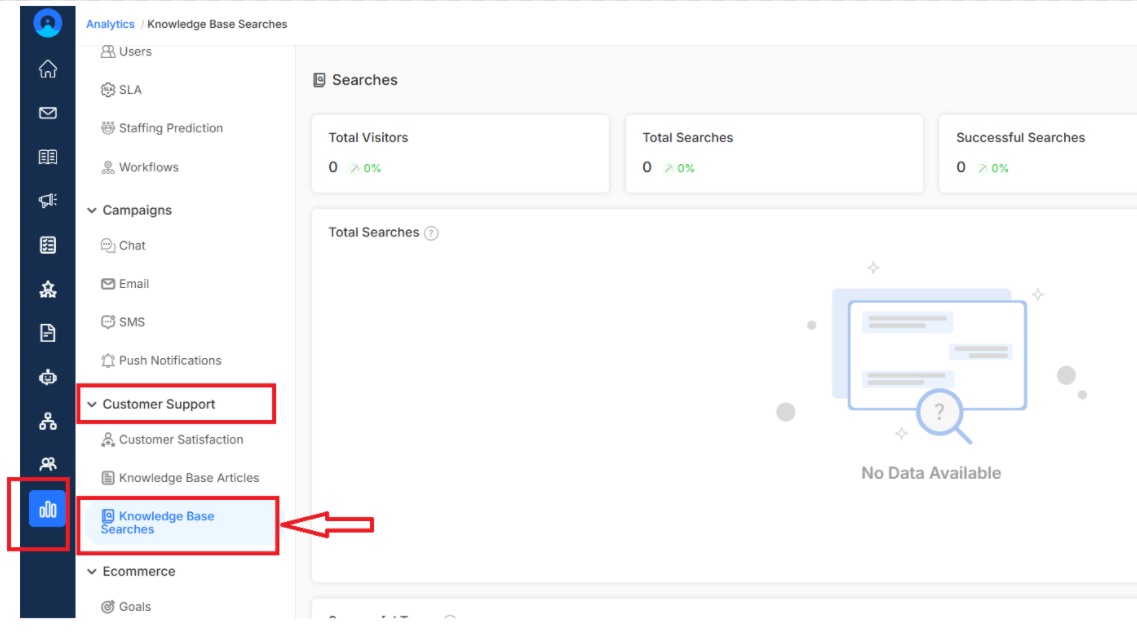
To access Knowledge Base Search reporting, navigate to Analytics for the main dashboard menu. You can find it under the customer support section
Top KPIs Included

Total Visitors
See how many people are visiting your knowledge base and whether that number is growing compared to the last period. This metric helps you understand that your knowledge base is becoming a go-to resource.
Note: More visitors usually means more people finding your knowledge base content helpful
Total Searches
Track how actively people are using your search feature. Higher search numbers often indicate that customers trust your knowledge base to find the answers they need.
Successful Searches
This is the good news metric, which visualizes how many searches actually led customers to the answers they needed. A high success rate means your content is searchable and truly solves the problems.
Failed Searches
Every failed search in the help center shows exactly what content you need to create or improve. It is a type of direct feedback from customers about what's missing.
Total Searches
Get a visual graph of search activity over time so you can spot patterns in your knowledge base. It helps you identify trends, peak usage times and if new content launches are driving more activity.
Successful Terms

This is the list of search terms in your knowledge base that consistently lead customers to helpful answers. learn from what's working to optimize other articles and understand the customers' behavior when seeking help.
Failed Terms

This is your to-do list where these searches didn't find what customers needed, giving you a clear indication of what content to create next.